Troubleshooting
General Advice
If you are having problems with the game, please try using the following instructions to try and fix any problems you are experiencing.
Always try running the recovery / cache updater tool first to see if it fixes your problem!
In most cases, this should fix problems with the game by ensuring you are on the latest version. This tool protects your save files and only deletes cached game build files.
Do NOT clear your site cache!
Clearing your site cache will almost always delete all of your save files. Please use the recovery / cache updater tool instead to safely fix the game build.
If you continue to experience problems, please consider joining the Discord to ask for assistance!
Make sure you've read the Discord rules prior to joining!
Backing up save files
It's always a good idea to back up your save files, especially if you don't think you'll be playing for an extended period. Sometimes, browsers will routinely delete data that hasn't been accessed in a long time, which can result in missing save files, unfortunately.
You are able to back up your save files in-game, however, and download them to your device. This should work on all devices, including mobile.
Save files are exported as .json files. You can also upload these files on another device if you want to carry your progress elsewhere!
Info
Sometimes, Taw might ask for your save file when troubleshooting to see if something looks out of the ordinary. Please be ready to provide this if you're having problems!
The game is just a pitch black box
This can happen sometimes when you are using a browser with WebGL turned off.
Does any of the games on this page work, or do they show similarly? WebGL Samples
If they also don't work, you likely have WebGL turned off. Please use your favourite search engine to check how to enable WebGL for whatever browser you are using.
For LibreWolf users, there is a known bug that causes this with large screens above 2048 pixels because of Enable ResistFingerprinting. This is planned to be fixed, but until then, you may need to turn this off.
The game goes blank and doesn't load anything when I move/interact
Sometimes, this happens if you are on an old build that is cached and you're trying to access something that's changed in the new build! Usually, there's a fallback system that prevents you getting stuck and adds a [Continue] button to push you back a space, but this doesn't always work.
Most caching issues should be fixed by now, and it should automatically update the game when you load to the main menu each time if there's something new. But this isn't infallible. Please run the recovery / cache updater tool to see if it fixes the issue.
I ran the recovery / cache updater and it didn't fix my problem
Uh-oh! Guess you probably have a more serious bug in the game. This might be something I accidentally broke in an update and need to push an update out for.
While in game, please open the developer console, and please send me what it shows.
Opening this might be different depending on your browser/platform. For most users on Windows, you can press CTRL+SHIFT+I to open the panel/window, then navigate to the console tab. This outputs things as you play and can help me narrow down the problem.
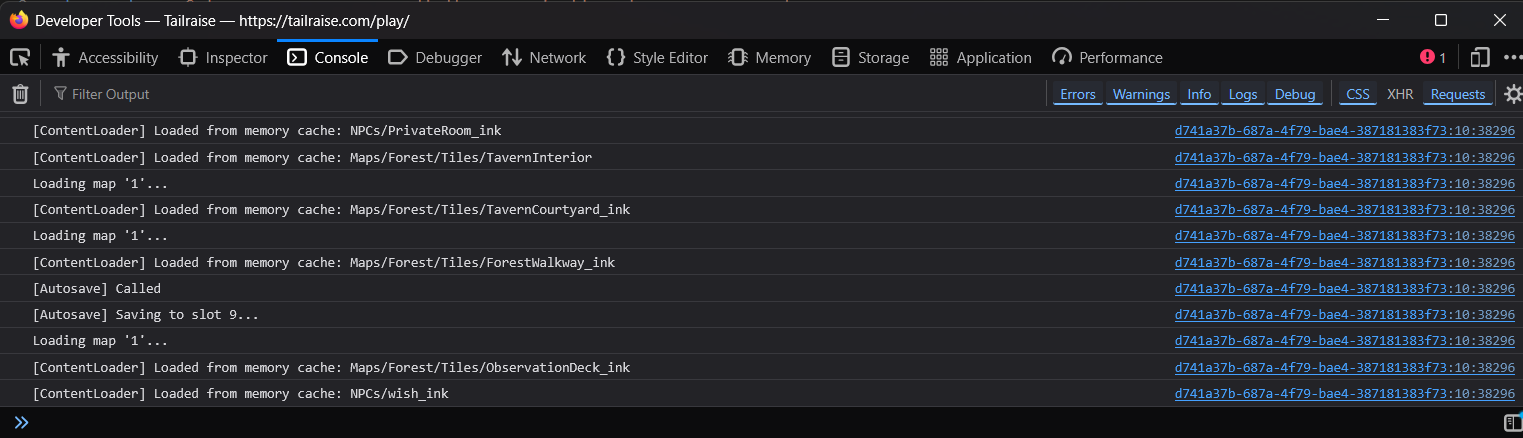
If you're on mobile and you cannot open the console tools, please join the Discord for help.
Make sure you've read the Discord rules prior to joining!
After you join and go through the #server-access procedures, please post in the #bug-report channel with the following:
- What device are you using?
- iPhone 11, Samsung Galaxy S20, Google Pixel 9a, etc.
- What browser are you using?
- Firefox, Chrome, Edge, etc.
- What were you doing in the game when this happened?
- I was just finishing talking with Flint, left the tavern, and south down to the starting tile with Taw and it broke, etc.
- Does this happen in other browsers or devices?
- If you can test on other browsers to see if you have the same problem, this helps significantly.
Provide ALL details, please!
Please try and provide as many details as you can about what you did, and please try to recreate the issue by loading a previous save. This helps to narrow down that cause and quickly fix a problem as soon as possible.
My game has problems with text showing as [[missing:pc.thing]]!
This means something is not referenced correctly, which either means I wrote the wrong tag in the story itself (woops!), or your save file has a field that is incorrect somewhere.
Please provide the scene this happened in, and, if possible, a screenshot of the full game page. This makes it easier for Taw to narrow down precisely where the problem was and fix it.
I found a typo!
Please report these in the Discord server! I try my best to fix these in a timely manner. Sometimes these get missed when I'm adding in a ton of content/features and I don't spend as much time proofreading as I should. Sorry!
Provide all the details!
Please don't just post a screenshot and say "there's a typo" and expect me to know exactly which file and scene it'll be in.
Tell me which sentence has the typo, and what it should be instead.
Remember that behind the scenes, the text you are seeing has a LOT of embedded code throughout the sentences, so this can be troublesome to find without knowing the exact spot, especially since a lot of content only is visible depending on your current genitalia, chastity situation, etc.